

When I was a kid, all I wanted to be was an artist.
You’d always find me in a corner somewhere with pencils, markers, paints, drawing whatever crazy things came into my head.
In fact when I was really young, my parents’ friends would ask what I wanted to be when I grew up and I would stare them dead in the eye and say “I AM an artist.”
I did go to art college. But I never found my medium.
I craved immediacy too much. I had no patience for process.
A lot of my artwork consisted of scribbled cartoons, quickly getting ideas out of my head and onto paper.
I think that’s why I’m obsessed with AI image generators.
Now I can have the idea, and execute with AI. In any style. Want that as a screen print? Sure thing! No need for a laborious process involving multiple stencils and screens and frames and exposures.
I still have huge respect for process, and human-made artworks. I just personally want to be able to create my ideas instantly with AI.
But let’s not get into the philosophical arguments today, let’s stick to how insanely powerful the ChatGPT image generator is.
This new tool has incredible capabilities and, with a little creative thinking applied, could give small businesses a way to quickly generate visuals for…
- emails
- blog posts
- social posts
- lead magnets
- ad campaigns
- course materials
- website graphics
- product mockups
- even pitch decks or proposals
So let’s take a look at what’s new, and why it’s worth your attention.
Want to make images with ChatGPT? Here’s what’s new.
Previously ChatGPT could generate images using an image generator called Dall-E. You’d ask ChatGPT for an image, and it would go and prompt a separate system, get the image from Dall-E and bring it back to you.
Dall-E was pretty good, but it lagged WAY behind competitors like Midjourney, Flux, or Ideogram.
Now, everything has changed. The image generator is baked into ChatGPT 4o directly. It has access to all of ChatGPT’s language abilities and training data.
This means you can conversationally prompt and iterate, and it’s really good at understanding even complicated prompts.
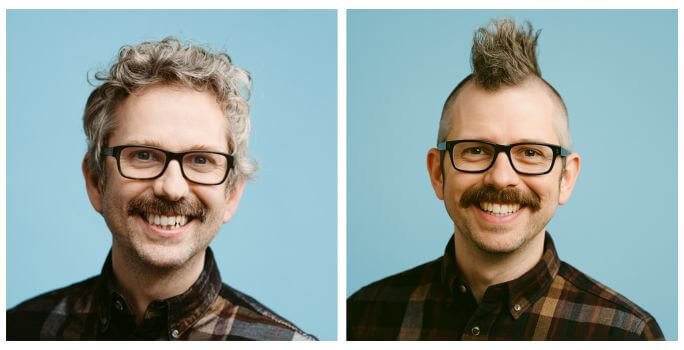
You can upload an image and edit it – however it does change the whole image sometimes – for example I asked it to give me a mohawk, and it did. But it also changed my face, and gave me free dental work!
It’s also now the best image generator at handling text.

It can generate PNGs with transparent backgrounds.

And it’s good (but not perfect) at creating consistent characters from reference images.
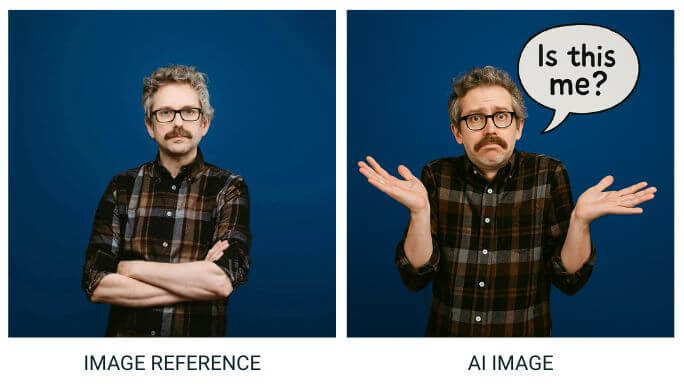
Everyone’s saying it’s now the best AI image generator available. So let’s have a look at some experiments I’ve tried.
I described my old cartoon… and ChatGPT brought it to life
Let’s start with some fun.
Remember the hastily scribbled cartoons I mentioned doing in college?
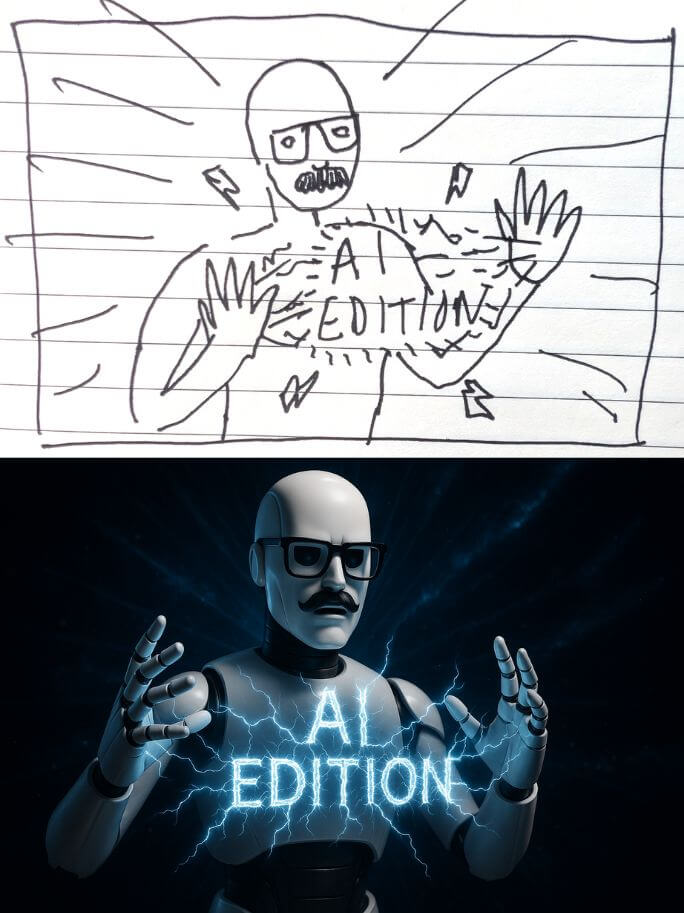
One of those cartoons depicted an existential crisis of sorts. I described the cartoon to ChatGPT, with a text prompt alone, and it recreated it brilliantly.
The original cartoon I drew is top left. Followed by three different versions generated by ChatGPT – all from text prompts 🤯
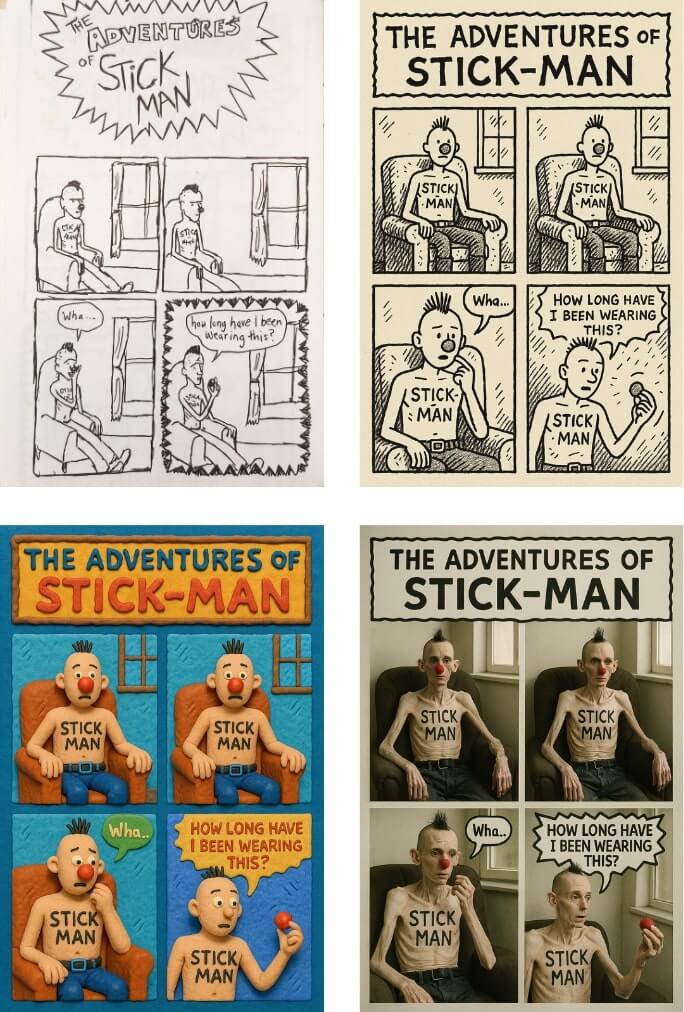
How could we use this for our businesses? Maybe you could add some comic storytelling to your marketing arsenal? That’s my plan.
Sketch your next idea. Let ChatGPT do the rest.
Since I was digging about in my old sketches I uploaded another drawing I did decades ago. It was inspired by pop-art culture, so I asked ChatGPT to turn it into an aged and distressed pop-art painting.
Then I had ChatGPT imagine it as a photo story (remember those from comics like Doomlord in Eagle?)
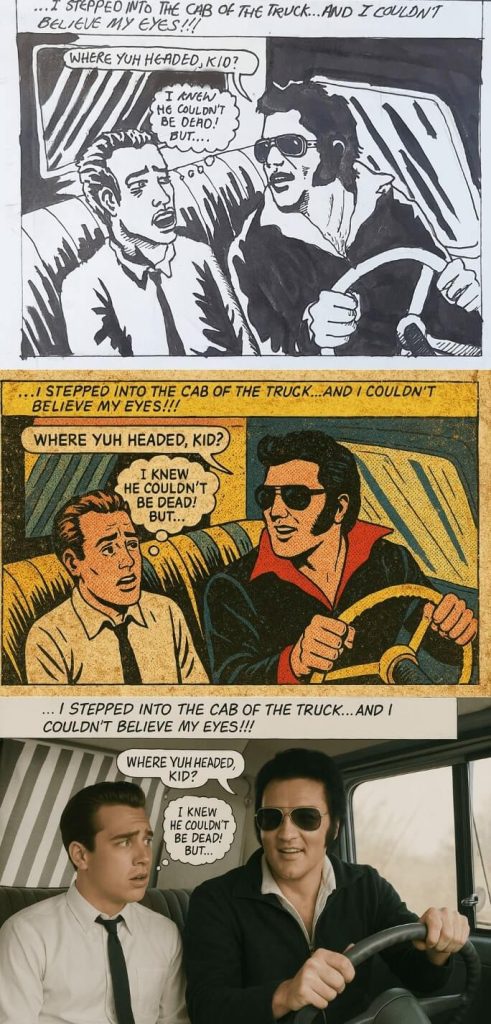
How can we use this in our businesses?
Sketch out your next marketing concept on a napkin and give it to ChatGPT to realise:
Replacing myself with AI: a cartoon case study
A long, long time ago, I illustrated cartoons for my writer friend Brendan O’Connell – AKA Bif.
I stopped drawing the cartoons in the end because they just took me too long to draw.
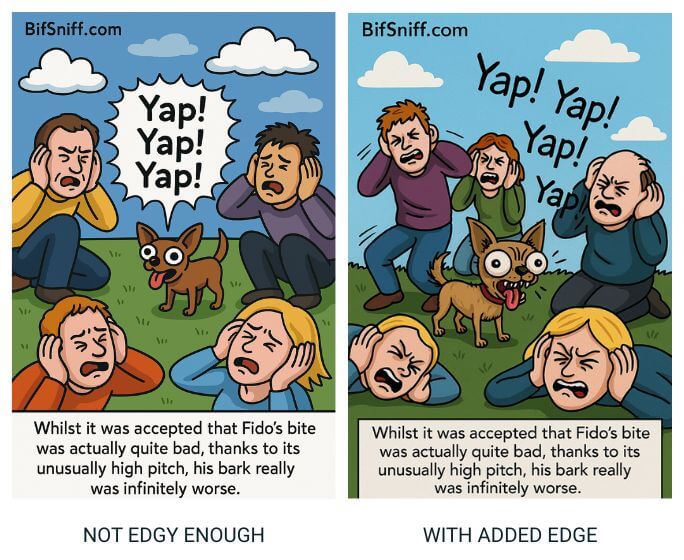
Myself and Bif wondered if AI was ready to take my place as Bif’s illustrator… I gave ChatGPT 10 example cartoons and gave it the brief for one of the cartoons. I did not give it the original version of the cartoon I was attempting to replicate:

The results blew me away. With examples of my style, and just a prompt describing the cartoon it did an incredible job.
Next we tried it with some cartoons Bif had written that never got made. When I showed the ChatGPT cartoons to Bif, he said they lacked an edge that my style had.
So I prompted ‘Can you make a version that has a little more edge in the illustration, just ever so slightly more deranged?’
That simple iteration was enough to convince Bif that maybe AI could replace me…
Now, you might not have a catalogue of your own illustrative work to guide ChatGPT, but what if you gave it any other brand materials that could guide it toward a specific aesthetic?
Speaking of which…
Want your visuals to match your brand? Try this.
ChatGPT is really good at generating images using your brand colours as inspiration. It won’t necessarily replicate the colours exactly, but for creating assets that fit within your brand aesthetic it’s perfect.
For example you could generate photos that echo your brand colours, or illustrations that sit within your website design beautifully.
All you have to do is upload an image of your brand colours, or specify the hex codes in your prompt.
Here you can see Frank and Marci’s brand colours, and four images generated that sit nicely with them, even if they’re not precisely the colours. Also note that ChatGPT generated all the text in the images below.

Before you use ChatGPT for AI product photos, read this
I’ve seen a lot of posts in my feed about ChatGPT generating product images.
Most of the posts are not from brands who are creating product images – they’re AI enthusiasts using famous brands as examples, even though the brands are not their clients.
I would urge extreme caution if you intend to try this.
Yes, you can give ChatGPT a product image and it will generate new images for you. You can prompt for lifestyle images, or place the product in particular settings.
But it will often change your product. Sometimes obviously, and sometimes not so obviously.
This could be great for brainstorming and creating brand moodboards.
However if you’re considering using these images in campaigns be extremely careful that the product is accurately represented.
If ChatGPT alters or exaggerates the product in a way that could mislead consumers, even subtly, it could be considered false advertising.
Here’s an example – with a product shot of a 5 piece knife block set. Notice how the knives are subtly different, they have a less elegant design. Similarly the proportions of the block are off. The AI version is squatter and wider than the actual product.
This was one of the more subtly altered products in my tests.
It’s an incredible achievement technically, but would you be comfortable using this as a product image?

ChatGPT vs Midjourney: who wins on artistic flair?
We’ve looked at some incredible examples of what ChatGPT can do.
And at first I wondered if it was time to cancel my Midourney subscription. But one of Midjourney’s strengths has always been its ability to generate beautiful and unique artistic styles.
I love creating Dadaist inspired collage-style images that I use to design ‘covers’ for my emails:
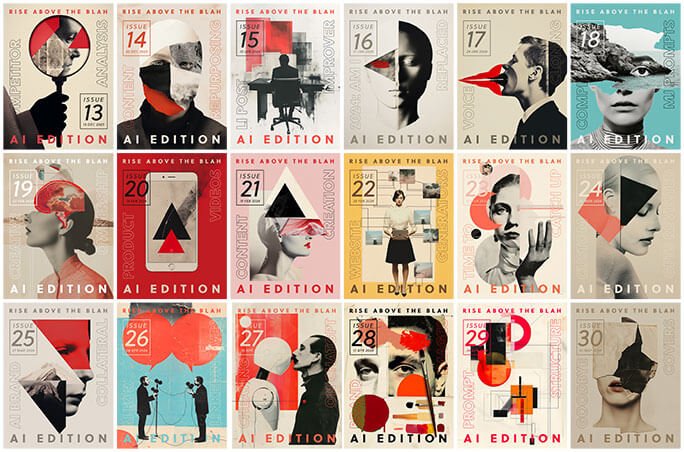
ChatGPT is incredibly powerful, but I found it very hard to replicate this kind of rough, slightly surreal, abstract, artistic output.
I tried text prompts alone. I tried giving it reference images. I tried asking ChatGPT to analyse the images and give me a prompt to achieve this style.
I got close by combining everything – using image references and a highly detailed prompt that ChatGPT wrote for me.
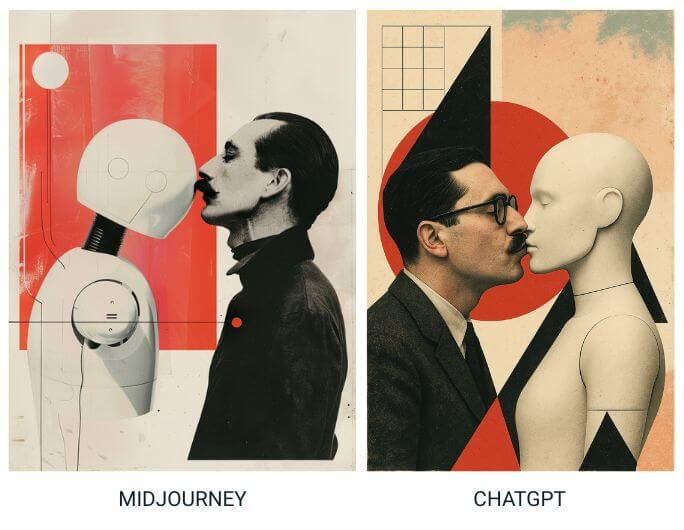
But it lacks a certain artistic integrity that Midjourney excels at.
For most small business owners this won’t be an issue.
But it’s worth remembering that many of these models have their own unique strengths, and Midjourney, who just released V7 last week will likely remain a firm favourite with creatives.
How I used ChatGPT to generate the featured image for this post
I had ChatGPT generate the featured image for this post. Here was my prompt, I also gave it 10 examples of previous featured images from this blog:
generate a 16:9 image representing the new ChatGPT image generator, without using text, and in the style of the attached images.
As you can see I left the intperpretation entirely up to ChatGPT. It came back with this:

I asked ChatGPT why it had chosen this visual and it said:
This illustration symbolises the convergence of human creativity and artificial intelligence. The robot—with a TV-like head displaying a woman’s portrait—represents how generative AI tools like ChatGPT are becoming mirrors or vessels for human expression. The mirror the robot holds can be seen as a metaphor for reflection, suggesting that AI not only absorbs and replicates human input, but also reflects it back, shaped through algorithms and code.
Stylistically, the splattered ink and comic-book aesthetic tie into themes of imagination, chaos, and control—reinforcing the tension and interplay between artistic spontaneity and mechanical precision. It’s a nod to AI as a creative partner, not just a tool.
So when you’re stuck for inspiration, you can absolutely lean on AI as your creative partner.
Final thoughts on using ChatGPT for image creation
ChatGPT’s new image generator is a big leap forward, but it’s not perfect, and it can be slow and unpredictable.
Don’t be fooled by the cherry-picked examples on social media. You’ll have to spend some time working with it to figure out its strengths and weaknesses.
While it’s easier to direct than other image generators, it’s still not a precision tool. So be prepared to compromise, and use it where you have leeway in your creative vision – not where you have an exact outcome in mind.
It can be extremely frustrating at times.
If I ask it for a 3:4 ratio it will give me a vertical aspect ratio – but not 3:4. Other image generators have no problem giving exact aspect ratios.
And some days it just completely ignores aspect ratio requests, and generates square images.
It’s amazing to be able to conversationally prompt, and say things like “that’s great, but now give the robot glasses and a moustache”, and see it iterate on images.
But when it goes wrong it can get ‘stuck’ on that error, so rather than beat your head against a wall trying to get it to change direction when that happens, start a fresh chat, upload the last good image it generated in your previous chat and start the process of iterating again.
It’s a massive step up from the previous ChatGPT image generator, Dall-E, and I think small businesses have an opportunity here to create scroll stopping visuals for their businesses with a little creativity applied.
So – serious question, please hit reply and let me know… what can you see yourself using this new image generator for? Any ideas?
Also, if you want to figure out what bottlenecks ChatGPT can help you with in your marketing and save yourself hours of work on a regular basis? Purchase a power hour with me.
And finally, check out the latest episode of The AI Argument, where we get into how AI is reshaping humanity, ongoing creative rights battles, and AI condoms of all things…!
